Case Converter by ConverteCaixa
Free online case converter. Transform your text instantly.
Text is processed in your browser and is not uploaded by the converter. The page itself is delivered over the internet.
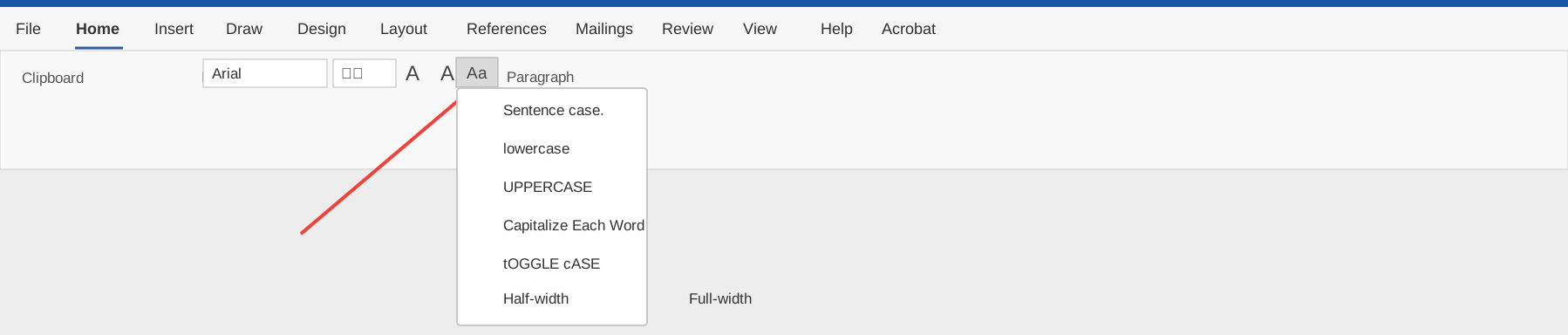
Use it with Word and Excel
Quick references for the two most common text-editing workflows.

UPPER(), LOWER(), or PROPER() beside your source column.About ConverteCaixa
ConverteCaixa is a free text conversion tool that runs entirely in your browser. Your text is transformed in your browser and is not uploaded by the converter. The page itself is delivered over the internet.
How to Convert Text Case
Paste or type your text in the input box, select your desired conversion mode, and the result appears instantly. You can copy the result, download it as a TXT file, or compare it side by side with the original.
Available Conversion Modes
- Sentence — Capitalize the first letter of each sentence
- lowercase — All letters in lowercase
- UPPERCASE — All letters in uppercase
- Capitalized — Capitalize the first letter of every word
- Title Case — Capitalization rules for titles
- Inverse — Swap uppercase and lowercase
- aLtErNaTiNg — Alternate between uppercase and lowercase
- tOGGLE — Toggle the case of each letter
Keyboard Shortcuts
Ctrl+Z— UndoCtrl+Y— Redo
Privacy and Security
All conversion happens locally in your browser. The converter does not upload, store, or analyze the text you enter. You can verify this by inspecting the page source or monitoring your browser's network traffic.
Special Character Support
ConverteCaixa supports full Unicode characters, including accented letters, symbols, and characters from other languages. Line breaks, paragraphs, and spaces are preserved during conversion.
Frequently Asked Questions
Does ConverteCaixa send my text to a server?
No. Conversion happens locally in your browser. The converter does not upload your text, although the website itself must be delivered over the internet.
Can I use ConverteCaixa offline?
Yes. Since all processing is done in the browser, the tool works even without an internet connection, as long as the page has already been loaded.
What characters are supported?
ConverteCaixa supports full Unicode characters, including accented letters, symbols, and characters from multiple languages.
Can I use ConverteCaixa on my phone?
Yes. The tool is fully responsive and works on any device, including smartphones and tablets.
How do I change case in Microsoft Word?
In Microsoft Word, press Shift+F3 to toggle between uppercase, lowercase, and capitalized. For more options, go to Format > Text > Change Case.
How do I change case in Google Sheets?
In Google Sheets, use the functions UPPER(), LOWER(), and PROPER() to convert text to uppercase, lowercase, and capitalized, respectively.